Tatum Robotics: A Deafblind-Friendly Doorbell
Background
Tatum Robotics is a subsidiary of MassRobotics that focuses on an underserved deaf-blind (DB) community. Their flagship product, shown on the right, is a robotic hand that communicates through ASL from mainstream communication media, which can be read visually or through tactility.
The company hopes to expand its resources for this community by addressing safety issues that they face. Many of those in the DB community are forced to leave their doors unlocked, as they may be unaware of any visitors. To combat this obvious safety concern, Tatum Robotics wants to offer an integrated doorbell and bracelet system that alerts individuals of anyone at the door. Through Generate, I worked with a team of engineers and designers to develop this product, with my focus being the mechanical designs of the doorbell.

Objectives, Constraints, & Skills Applied
Objectives
-
Design a doorbell that communicates with a tactile- feedback wearable device that will not only alert the user when someone is at the door, but can differentiate between known visitors (such as friends and family) and unknown visitors (such as delivery drivers).
Constraints
-
The doorbell must communicate wirelessly with the wearable device
-
The doorbell must include multiple inputs to differentiate between the different types of users (unknown vs known guest)
-
The doorbell must be inconspicuous, as to not draw attention that a DB individual resides there.
-
The doorbell must provide DB friendly feedback to the visitor
Skills Applied
-
SolidWorks 3D Modeling
-
Plastic Part Design
-
User Testing and User-Centered Design
-
Design for Assembly (DFA)
Initial Doorbell Design
The initial concept for the doorbell included a snap fitted top and bottom enclosure, as well as a tactile keypad for known visitors to enter a password with a screen to provide feedback.


Assembly & Components
The front and rear housings fit into a 140 mm x 80 mm frame, containing the screen, keypad, and RedBoard. For this prototype, a known visitor would type in a password - which would be displayed on the screen - then press the pound key to deliver a distinct tactile alert to the homeowner. An unknown visitor would simply press the pound key to send the other alert to them.

Feedback & Iteration
Although this design satisfied many of the objectives and constraints, preliminary user testing showed that there were some key issues in this design:
-
From a use-case standpoint, ringing the doorbell was not intuitive. A random person should be able to use this product without the need for instructions.
-
The product did not look look like a doorbell, but something closer to a calculator. This could draw unwanted attention to the home.
-
The keypad provided far too many options than was necessary.
-
While having a screen was helpful for the hearing-impaired, blind individuals would not have any feedback from inputting the code.
Gathering this feedback was invaluable for my next design iteration. To accomplish this, the following conditions had to have been met:
-
From an ID perspective, create housings that looked similar to industry-standard doorbells to both increase intuitiveness of use and reduce chance of attracting unnecessary attention.
-
Separate the doorbell button from the password buttons (in size, location, color, etc.) to make usage clearer for unknown visitors.
-
Reduce the amount of buttons for the password, and consider reusing buttons to make the overall design cleaner.
-
Develop a better feedback mechanism that accounts for both deaf and blind individuals.
Top Level Doorbell Redesign
The second doorbell iteration kept a top and bottom housing, except replaced the overall rectangular design with a sleek oval shape. The number of buttons were reduced for simplicity, and LEDs were added instead of the screen to provide feedback.


Front Housing
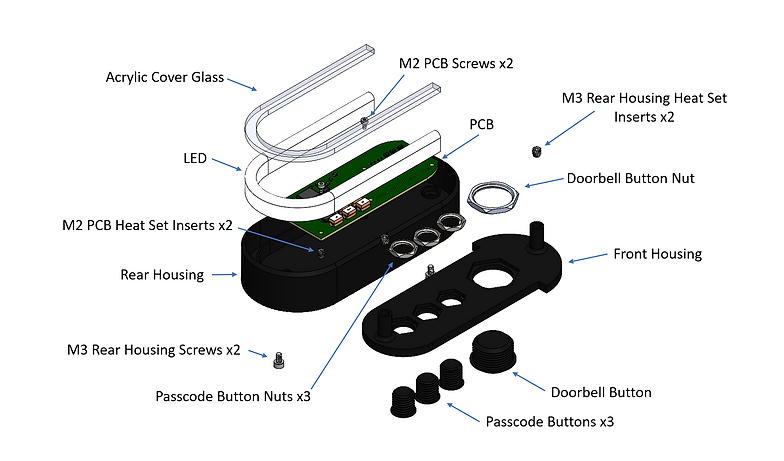
The front housing now consists of the plastic enclosure, 3 passcode buttons with nuts, 1 doorbell button with nut, heat set inserts for attachment to rear housing, and an acrylic cover glass attached by liquid adhesive.
Key Design Changes
-
A full keypad was replaced with 4 total buttons, 3 for the passcode and 1 for the doorbell. The doorbell button is both larger and placed at the top so that an unknown visitor can easily use the device without instruction.
-
The amount of buttons was reduced for simplicity, as the previous design had too many options. Braille was added to the left-hand side of each button for greater accessibility.
-
The Tatum Robotics logo was imprinted on the top of the doorbell.
Rear Housing
The rear housing consists of the LED and custom PCB. Heat set inserts and corresponding screws are used for the PCB and another set of screws are used for the attachment of both housings.
Key Design Changes
-
To create better feedback for DB users, an LED was incorporated to replace the screen. Since blindness can be better understood as a spectrum, differentiating between contrasting colors would be much easier than reading fine print on a screen for certain blind individuals.
-
A DFA approach was taken to add locating features for both the LED and the standoffs from the front housing (which contain the heat set inserts for attachment). A thin wall was added to keep the LED in place and a circular cavity was used to guide the standoffs in place to align the screws with the inserts. This reduces the need for adhesives or other parts to assemble the doorbell.
Results

Button & LED Functionality
The LED offers feedback to the user each time a button is pressed. When an unknown visitor presses the main doorbell button, the LED flashes white. When a passcode is entered, the light will flash blue at each button press and will either turn red or green depending on whether the inputted code is correct or not. It is understood that any expected visitor will be given the code prior to reaching the home.
Future Design Considerations
Possible future designs can include:
-
Addition of an auditory output for feedback. The LED accounts of varying levels of blindness, but any individuals who are completely blind would benefit from an audio response from the doorbell.
-
A separate doorbell mount for attachment to the front of any home. The back of the doorbell has a hole for 2 wires for connection to house power, so this doorbell can replace any existing doorbell. All that is needed is a mount for attachment.
